A plugin’s metadata names it: a key that no other plugin uses, a display name, a description and an icon. Its
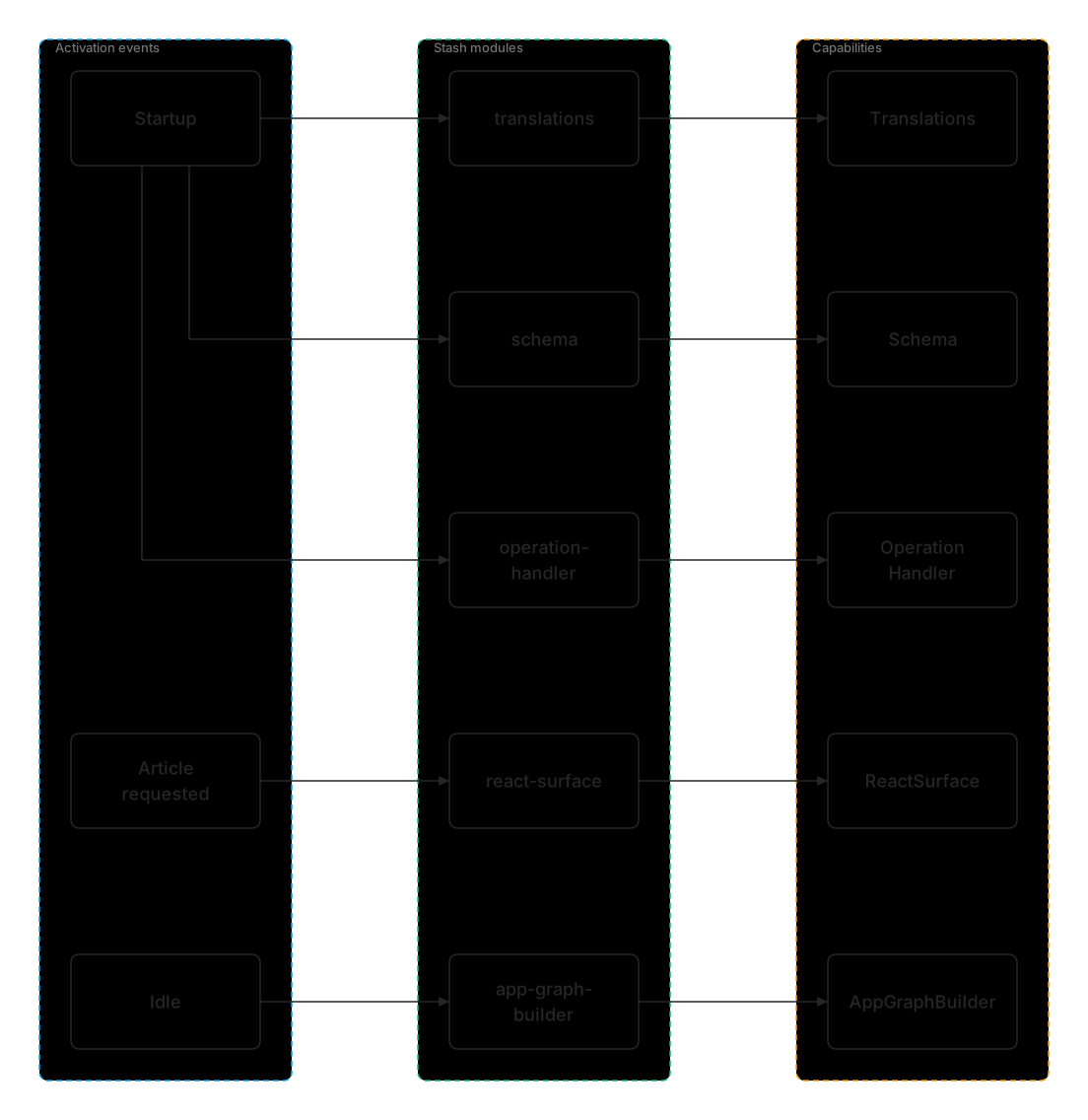
modules do the work. Each module activates on an event, runs once, and contributes
capabilities: typed values, such as a surface component or an operation handler,
that other modules look up.
Plugin.define takes the metadata, Plugin.addModule adds each module, and Plugin.make returns a function that the
app’s plugin manager calls to create the plugin.
Adds a module to a plugin builder. Supports both pipeline and direct call styles.
Accepts either:
A spec-carrying module (
Capability.lazyModule
/
Capability.inlineModule
):
requires/provides/activatesOn/props all come from the module's own spec (declared where
it is authored), so the call needs only an optional id override.
An inline authoring record (or a function receiving plugin options): declares
provides/requires (dependency mode) or activatesOn + requires/provides
(runtime-event mode); the activate effect's environment is constrained to the declared
requires and its return must cover the declared provides.
Creates a Plugin from a builder.
Supports both pipeline and direct call styles.
Always returns a factory function (options: T) => Plugin.
When T is void, the function takes no arguments: () => Plugin.
make,
6
);
7
A plugin you publish describes itself in a dx.config.tsmanifest instead. Plugin.config takes the same
metadata, plus registry fields such as tags, and the list of modules. It returns the plugin’s meta and its make
function, so the registry can read the plugin without loading its code.
Author or organization name. Only used for bundled plugins. For plugins published to the
registry this field is ignored — the verified publisher (handle ?? did) is used instead.
author: 'Example',
17
description?: string | undefined
description:
18
'A reading list: save links with a note, and mark them as read.',
19
icon?: {
readonly key: string;
readonly hue?: string | undefined;
} | undefined
icon: {
key: string
key: 'ph--tray-arrow-down--regular',
hue?: string | undefined
hue: 'indigo' },
20
tags?: readonly string[] | undefined
tags: ['labs'],
21
},
22
modules: readonly (Module<any> | undefined)[]
Module specs only; each body is a dynamic import, so reading the config loads no plugin code.
Module contributing schemas. Prefer the loader form — schema objects ride whatever barrels
declare them, so an inline list drags those barrels into the plugin definition's static
closure (the boot evaluation floor); a loader keeps them in the module body chunk.
Module maker contributing operation handlers. Handler sets register eagerly by default: a
keyed set is a definition→loader map with a thin closure (definitions carry no
implementations), so the operation registry is complete at boot while each handler's BODY
still loads per invocation. The deferral axis is the operation, not the module.
A feature plugin whose operations cannot be invoked before the app is interactive declares
activatesOn: ActivationEvents.Idle to register in that wave instead of on the startup pass;
the boot path (deck, layout, space, client) invokes operations during startup and stays eager.
Stated explicitly rather than inherited: omitting activatesOn now normalizes to Idle, which
would leave the registry incomplete for exactly those boot-path invocations.
Module maker contributing a typed create-object entry. Gated by default on the create flow
opening (all consumers read the entries reactively); declare activatesOn to override.
Module maker contributing app-graph node builders. Gated by default on the host's idle event
rather than the contributing plugin's own start: a builder is what puts a plugin's items in
the navtree, so gating it on the plugin's own start (fired when its surface renders) is a
deadlock — the item never appears, so it can never be opened. Declare activatesOn to override.
Module maker contributing React surfaces. Declaring roles (the role tokens the module's
surfaces bind, e.g. AppSurface.Article or a plugin's <Plugin>Surface tokens) gates the module
on those roles' demand events
(
ActivationEvents.SurfacesRequested
) — it loads when a Surface for one of its roles
first renders instead of at startup. Modules without declared roles stay eager; an explicit
activatesOn wins over the derived gate.
Module maker contributing skill definitions. Gated by default on the assistant plugin's start
event — a skill belongs to the assistant feature regardless of which plugin contributes it
(skills register into a shared registry whose consumers are reactive); declare activatesOn
to override.
A module is inline or lazy. Capability.inlineModule carries its body with it. Capability.lazyModule
names a loader, and the plugin manager imports the body only when the module’s event fires. A module whose event
never fires never loads, so a plugin costs nothing until it is used.
Helper to define a lazily loaded module body with an eager requires/provides spec.
The spec is available without importing the chunk (dependency ordering happens before
code-splitting resolves) and the loaded default export is type-checked against it. The
returned
Module
is opaque with respect to requires/provides/props, parameterized
only by Options — this is what eliminates TS2883 at every call site.
The lazy pairing of
makeModule
.
@param ― name The export name (e.g., 'AppGraphBuilder') - used to auto-compute module IDs.
@param ― spec The requires/provides declaration, matching the module authoring site.
Activates when this runtime event fires instead of during the dependency pass.
activatesOn:
import ActivationEvents
ActivationEvents.
const Idle: ActivationEvent
Fired once by the host at main-thread idle after the app is interactive.
For REGISTRATION contributions only — graph builders, operation handler sets, settings: the
app-wide indexes a user can reach from anywhere (the navtree, the operation registry, a
settings read) and which therefore no single surface can gate. A feature's own modules ride
its plugin start event, fired when its surface renders; putting a feature body here instead
is what turned the former DeferredStartup into a second startup pass.
This is also what omitting activatesOn normalizes to, so a module that must run at boot has
to say activatesOn: ActivationEvents.Startup explicitly. Defined in core; see
Helper to define a capability module with explicit typing.
Wraps the default export function to provide better type inference and make the pattern explicit.
This helper provides explicit typing for the module activation function,
making it clear that the function should:
Access declared requires via yield* (or the ambient Capability.Service/Plugin.Service)
The module makers in AppCapability, such as AppCapability.surface, fix a module’s capability and its event, so a
manifest names only the file to load. The loader’s default export is checked against the capability at compile time.
Every module declares what it provides and what it requires. The plugin manager uses them to order activation;
Activation covers the rules.
Plugins never import each other’s modules. A plugin that extends another contributes to a capability the other
reads.
A plugin’s key is a reverse-domain name, and its last segment must be camelCase. Keep the key once the plugin has
users: settings and enabled state are stored under it.
A module keeps no state between activations. What it needs to keep, it contributes or stores.


%3B%20%7D%0A%0A%20%20svg%20%7B%20color%3A%20%23e5e5e5%3B%20background%3A%20%231d1f20%3B%20--surface-bg%3A%20%231d1f20%3B%20%7D%0A%20%20.dark%5C%3Afill-neutral-200%20%7B%20fill%3A%20%23e5e5e5%3B%20%7D%0A%20%20.dark%5C%3Astroke-neutral-200%20%7B%20stroke%3A%20%23e5e5e5%3B%20%7D%0A%20%20.dark%5C%3Atext-neutral-200%20%7B%20color%3A%20%23e5e5e5%3B%20%7D%0A%20%20.dark%5C%3Atext-neutral-400%20%7B%20color%3A%20%23a3a3a3%3B%20%7D%0A%3C%2Fstyle%3E%3Cdefs%3E%3Cmarker%20id%3D%22dx-arrow%22%20viewBox%3D%220%200%2010%2010%22%20refX%3D%229%22%20refY%3D%225%22%20markerWidth%3D%228%22%20markerHeight%3D%228%22%20orient%3D%22auto-start-reverse%22%3E%3Cpath%20d%3D%22M%200%201%20L%209%205%20L%200%209%20z%22%20class%3D%22fill-neutral-800%20dark%3Afill-neutral-200%20stroke-none%22%3E%3C%2Fpath%3E%3C%2Fmarker%3E%3Cmarker%20id%3D%22dx-triangle%22%20viewBox%3D%220%200%2012%2012%22%20refX%3D%2211%22%20refY%3D%226%22%20markerWidth%3D%2212%22%20markerHeight%3D%2212%22%20orient%3D%22auto-start-reverse%22%3E%3Cpath%20d%3D%22M%201%201%20L%2011%206%20L%201%2011%20z%22%20fill%3D%22var(--surface-bg%2C%20%23ffffff)%22%20class%3D%22stroke-neutral-800%20dark%3Astroke-neutral-200%22%20stroke-width%3D%221.2%22%3E%3C%2Fpath%3E%3C%2Fmarker%3E%3Cmarker%20id%3D%22dx-crowsfoot%22%20viewBox%3D%220%200%2012%2012%22%20refX%3D%2211%22%20refY%3D%226%22%20markerWidth%3D%2212%22%20markerHeight%3D%2212%22%20orient%3D%22auto-start-reverse%22%3E%3Cpath%20d%3D%22M%200%206%20L%2011%201%20M%200%206%20L%2011%206%20M%200%206%20L%2011%2011%22%20class%3D%22fill-none%20stroke-neutral-800%20dark%3Astroke-neutral-200%22%20stroke-width%3D%221.2%22%3E%3C%2Fpath%3E%3C%2Fmarker%3E%3Cmarker%20id%3D%22dx-open%22%20viewBox%3D%220%200%2012%2012%22%20refX%3D%2211%22%20refY%3D%226%22%20markerWidth%3D%2212%22%20markerHeight%3D%2212%22%20orient%3D%22auto-start-reverse%22%3E%3Cpath%20d%3D%22M%201%201%20L%2011%206%20L%201%2011%22%20class%3D%22fill-none%20stroke-neutral-800%20dark%3Astroke-neutral-200%22%20stroke-width%3D%221.2%22%3E%3C%2Fpath%3E%3C%2Fmarker%3E%3Cmarker%20id%3D%22dx-one%22%20viewBox%3D%220%200%2012%2012%22%20refX%3D%2211%22%20refY%3D%226%22%20markerWidth%3D%2212%22%20markerHeight%3D%2212%22%20orient%3D%22auto-start-reverse%22%3E%3Cpath%20d%3D%22M%207%201%20L%207%2011%22%20class%3D%22fill-none%20stroke-neutral-800%20dark%3Astroke-neutral-200%22%20stroke-width%3D%221.2%22%3E%3C%2Fpath%3E%3C%2Fmarker%3E%3Cmarker%20id%3D%22dx-diamond%22%20viewBox%3D%220%200%2018%2010%22%20refX%3D%2217%22%20refY%3D%225%22%20markerWidth%3D%2218%22%20markerHeight%3D%2210%22%20orient%3D%22auto-start-reverse%22%3E%3Cpath%20d%3D%22M%201%205%20L%209%201%20L%2017%205%20L%209%209%20z%22%20fill%3D%22var(--surface-bg%2C%20%23ffffff)%22%20class%3D%22stroke-neutral-800%20dark%3Astroke-neutral-200%22%20stroke-width%3D%221.2%22%3E%3C%2Fpath%3E%3C%2Fmarker%3E%3Cmarker%20id%3D%22dx-diamond-filled%22%20viewBox%3D%220%200%2018%2010%22%20refX%3D%2217%22%20refY%3D%225%22%20markerWidth%3D%2218%22%20markerHeight%3D%2210%22%20orient%3D%22auto-start-reverse%22%3E%3Cpath%20d%3D%22M%201%205%20L%209%201%20L%2017%205%20L%209%209%20z%22%20class%3D%22fill-neutral-800%20dark%3Afill-neutral-200%20stroke-neutral-800%20dark%3Astroke-neutral-200%22%20stroke-width%3D%221.2%22%3E%3C%2Fpath%3E%3C%2Fmarker%3E%3Cmarker%20id%3D%22dx-circle%22%20viewBox%3D%220%200%2010%2010%22%20refX%3D%222%22%20refY%3D%225%22%20markerWidth%3D%228%22%20markerHeight%3D%228%22%20orient%3D%22auto%22%3E%3Ccircle%20cx%3D%225%22%20cy%3D%225%22%20r%3D%223%22%20class%3D%22fill-neutral-800%20dark%3Afill-neutral-200%20stroke-none%22%3E%3C%2Fcircle%3E%3C%2Fmarker%3E%3C%2Fdefs%3E%3Cg%20data-object%3D%22events%22%3E%3Cg%20class%3D%22stroke-current%20text-sky-500%22%20stroke-width%3D%221.5%22%20stroke-dasharray%3D%226%204%22%3E%3Crect%20x%3D%22-32%22%20y%3D%22-32%22%20width%3D%22256%22%20height%3D%221056%22%20rx%3D%228%22%20fill%3D%22%23e7f6fd%22%20style%3D%22fill%3Acolor-mix(in%20srgb%2C%20currentColor%2010%25%2C%20var(--surface-bg%2C%20transparent))%22%3E%3C%2Frect%3E%3C%2Fg%3E%3Ctext%20x%3D%22-16%22%20y%3D%22-19%22%20font-size%3D%2213%22%20font-weight%3D%22500%22%20class%3D%22fill-current%20text-neutral-500%20dark%3Atext-neutral-400%22%3E%3Ctspan%20x%3D%22-16%22%20dy%3D%220%22%3EActivation%20events%3C%2Ftspan%3E%3C%2Ftext%3E%3C%2Fg%3E%3Cg%20data-object%3D%22modules%22%3E%3Cg%20class%3D%22stroke-current%20text-emerald-500%22%20stroke-width%3D%221.5%22%20stroke-dasharray%3D%226%204%22%3E%3Crect%20x%3D%22352%22%20y%3D%22-32%22%20width%3D%22256%22%20height%3D%221056%22%20rx%3D%228%22%20fill%3D%22%23e7f8f2%22%20style%3D%22fill%3Acolor-mix(in%20srgb%2C%20currentColor%2010%25%2C%20var(--surface-bg%2C%20transparent))%22%3E%3C%2Frect%3E%3C%2Fg%3E%3Ctext%20x%3D%22368%22%20y%3D%22-19%22%20font-size%3D%2213%22%20font-weight%3D%22500%22%20class%3D%22fill-current%20text-neutral-500%20dark%3Atext-neutral-400%22%3E%3Ctspan%20x%3D%22368%22%20dy%3D%220%22%3EStash%20modules%3C%2Ftspan%3E%3C%2Ftext%3E%3C%2Fg%3E%3Cg%20data-object%3D%22caps%22%3E%3Cg%20class%3D%22stroke-current%20text-amber-500%22%20stroke-width%3D%221.5%22%20stroke-dasharray%3D%226%204%22%3E%3Crect%20x%3D%22736%22%20y%3D%22-32%22%20width%3D%22256%22%20height%3D%221056%22%20rx%3D%228%22%20fill%3D%22%23fef5e7%22%20style%3D%22fill%3Acolor-mix(in%20srgb%2C%20currentColor%2010%25%2C%20var(--surface-bg%2C%20transparent))%22%3E%3C%2Frect%3E%3C%2Fg%3E%3Ctext%20x%3D%22752%22%20y%3D%22-19%22%20font-size%3D%2213%22%20font-weight%3D%22500%22%20class%3D%22fill-current%20text-neutral-500%20dark%3Atext-neutral-400%22%3E%3Ctspan%20x%3D%22752%22%20dy%3D%220%22%3ECapabilities%3C%2Ftspan%3E%3C%2Ftext%3E%3C%2Fg%3E%3Cg%20data-object%3D%22Startup%22%3E%3Cg%20class%3D%22stroke-current%22%20stroke-width%3D%221.5%22%3E%3Crect%20x%3D%220%22%20y%3D%220%22%20width%3D%22192%22%20height%3D%2296%22%20rx%3D%228%22%20class%3D%22fill-transparent%22%3E%3C%2Frect%3E%3Ctext%20x%3D%2296%22%20y%3D%2248%22%20text-anchor%3D%22middle%22%20dominant-baseline%3D%22central%22%20font-size%3D%2218%22%20class%3D%22fill-current%20stroke-none%22%3E%3Ctspan%20x%3D%2296%22%20dy%3D%220%22%3EStartup%3C%2Ftspan%3E%3C%2Ftext%3E%3C%2Fg%3E%3C%2Fg%3E%3Cg%20data-object%3D%22Article%22%3E%3Cg%20class%3D%22stroke-current%22%20stroke-width%3D%221.5%22%3E%3Crect%20x%3D%220%22%20y%3D%22672%22%20width%3D%22192%22%20height%3D%2296%22%20rx%3D%228%22%20class%3D%22fill-transparent%22%3E%3C%2Frect%3E%3Ctext%20x%3D%2296%22%20y%3D%22707%22%20text-anchor%3D%22middle%22%20dominant-baseline%3D%22central%22%20font-size%3D%2218%22%20class%3D%22fill-current%20stroke-none%22%3E%3Ctspan%20x%3D%2296%22%20dy%3D%220%22%3EArticle%3C%2Ftspan%3E%3Ctspan%20x%3D%2296%22%20dy%3D%2226%22%3Erequested%3C%2Ftspan%3E%3C%2Ftext%3E%3C%2Fg%3E%3C%2Fg%3E%3Cg%20data-object%3D%22Idle%22%3E%3Cg%20class%3D%22stroke-current%22%20stroke-width%3D%221.5%22%3E%3Crect%20x%3D%220%22%20y%3D%22896%22%20width%3D%22192%22%20height%3D%2296%22%20rx%3D%228%22%20class%3D%22fill-transparent%22%3E%3C%2Frect%3E%3Ctext%20x%3D%2296%22%20y%3D%22944%22%20text-anchor%3D%22middle%22%20dominant-baseline%3D%22central%22%20font-size%3D%2218%22%20class%3D%22fill-current%20stroke-none%22%3E%3Ctspan%20x%3D%2296%22%20dy%3D%220%22%3EIdle%3C%2Ftspan%3E%3C%2Ftext%3E%3C%2Fg%3E%3C%2Fg%3E%3Cg%20data-object%3D%22Translations%22%3E%3Cg%20class%3D%22stroke-current%22%20stroke-width%3D%221.5%22%3E%3Crect%20x%3D%22384%22%20y%3D%220%22%20width%3D%22192%22%20height%3D%2296%22%20rx%3D%228%22%20class%3D%22fill-transparent%22%3E%3C%2Frect%3E%3Ctext%20x%3D%22480%22%20y%3D%2248%22%20text-anchor%3D%22middle%22%20dominant-baseline%3D%22central%22%20font-size%3D%2218%22%20class%3D%22fill-current%20stroke-none%22%3E%3Ctspan%20x%3D%22480%22%20dy%3D%220%22%3Etranslations%3C%2Ftspan%3E%3C%2Ftext%3E%3C%2Fg%3E%3C%2Fg%3E%3Cg%20data-object%3D%22Schema%22%3E%3Cg%20class%3D%22stroke-current%22%20stroke-width%3D%221.5%22%3E%3Crect%20x%3D%22384%22%20y%3D%22224%22%20width%3D%22192%22%20height%3D%2296%22%20rx%3D%228%22%20class%3D%22fill-transparent%22%3E%3C%2Frect%3E%3Ctext%20x%3D%22480%22%20y%3D%22272%22%20text-anchor%3D%22middle%22%20dominant-baseline%3D%22central%22%20font-size%3D%2218%22%20class%3D%22fill-current%20stroke-none%22%3E%3Ctspan%20x%3D%22480%22%20dy%3D%220%22%3Eschema%3C%2Ftspan%3E%3C%2Ftext%3E%3C%2Fg%3E%3C%2Fg%3E%3Cg%20data-object%3D%22Ops%22%3E%3Cg%20class%3D%22stroke-current%22%20stroke-width%3D%221.5%22%3E%3Crect%20x%3D%22384%22%20y%3D%22448%22%20width%3D%22192%22%20height%3D%2296%22%20rx%3D%228%22%20class%3D%22fill-transparent%22%3E%3C%2Frect%3E%3Ctext%20x%3D%22480%22%20y%3D%22483%22%20text-anchor%3D%22middle%22%20dominant-baseline%3D%22central%22%20font-size%3D%2218%22%20class%3D%22fill-current%20stroke-none%22%3E%3Ctspan%20x%3D%22480%22%20dy%3D%220%22%3Eoperation-%3C%2Ftspan%3E%3Ctspan%20x%3D%22480%22%20dy%3D%2226%22%3Ehandler%3C%2Ftspan%3E%3C%2Ftext%3E%3C%2Fg%3E%3C%2Fg%3E%3Cg%20data-object%3D%22Surface%22%3E%3Cg%20class%3D%22stroke-current%22%20stroke-width%3D%221.5%22%3E%3Crect%20x%3D%22384%22%20y%3D%22672%22%20width%3D%22192%22%20height%3D%2296%22%20rx%3D%228%22%20class%3D%22fill-transparent%22%3E%3C%2Frect%3E%3Ctext%20x%3D%22480%22%20y%3D%22720%22%20text-anchor%3D%22middle%22%20dominant-baseline%3D%22central%22%20font-size%3D%2218%22%20class%3D%22fill-current%20stroke-none%22%3E%3Ctspan%20x%3D%22480%22%20dy%3D%220%22%3Ereact-surface%3C%2Ftspan%3E%3C%2Ftext%3E%3C%2Fg%3E%3C%2Fg%3E%3Cg%20data-object%3D%22Graph%22%3E%3Cg%20class%3D%22stroke-current%22%20stroke-width%3D%221.5%22%3E%3Crect%20x%3D%22384%22%20y%3D%22896%22%20width%3D%22192%22%20height%3D%2296%22%20rx%3D%228%22%20class%3D%22fill-transparent%22%3E%3C%2Frect%3E%3Ctext%20x%3D%22480%22%20y%3D%22931%22%20text-anchor%3D%22middle%22%20dominant-baseline%3D%22central%22%20font-size%3D%2218%22%20class%3D%22fill-current%20stroke-none%22%3E%3Ctspan%20x%3D%22480%22%20dy%3D%220%22%3Eapp-graph-%3C%2Ftspan%3E%3Ctspan%20x%3D%22480%22%20dy%3D%2226%22%3Ebuilder%3C%2Ftspan%3E%3C%2Ftext%3E%3C%2Fg%3E%3C%2Fg%3E%3Cg%20data-object%3D%22CTranslations%22%3E%3Cg%20class%3D%22stroke-current%22%20stroke-width%3D%221.5%22%3E%3Crect%20x%3D%22768%22%20y%3D%220%22%20width%3D%22192%22%20height%3D%2296%22%20rx%3D%228%22%20class%3D%22fill-transparent%22%3E%3C%2Frect%3E%3Ctext%20x%3D%22864%22%20y%3D%2248%22%20text-anchor%3D%22middle%22%20dominant-baseline%3D%22central%22%20font-size%3D%2218%22%20class%3D%22fill-current%20stroke-none%22%3E%3Ctspan%20x%3D%22864%22%20dy%3D%220%22%3ETranslations%3C%2Ftspan%3E%3C%2Ftext%3E%3C%2Fg%3E%3C%2Fg%3E%3Cg%20data-object%3D%22CSchema%22%3E%3Cg%20class%3D%22stroke-current%22%20stroke-width%3D%221.5%22%3E%3Crect%20x%3D%22768%22%20y%3D%22224%22%20width%3D%22192%22%20height%3D%2296%22%20rx%3D%228%22%20class%3D%22fill-transparent%22%3E%3C%2Frect%3E%3Ctext%20x%3D%22864%22%20y%3D%22272%22%20text-anchor%3D%22middle%22%20dominant-baseline%3D%22central%22%20font-size%3D%2218%22%20class%3D%22fill-current%20stroke-none%22%3E%3Ctspan%20x%3D%22864%22%20dy%3D%220%22%3ESchema%3C%2Ftspan%3E%3C%2Ftext%3E%3C%2Fg%3E%3C%2Fg%3E%3Cg%20data-object%3D%22COps%22%3E%3Cg%20class%3D%22stroke-current%22%20stroke-width%3D%221.5%22%3E%3Crect%20x%3D%22768%22%20y%3D%22448%22%20width%3D%22192%22%20height%3D%2296%22%20rx%3D%228%22%20class%3D%22fill-transparent%22%3E%3C%2Frect%3E%3Ctext%20x%3D%22864%22%20y%3D%22483%22%20text-anchor%3D%22middle%22%20dominant-baseline%3D%22central%22%20font-size%3D%2218%22%20class%3D%22fill-current%20stroke-none%22%3E%3Ctspan%20x%3D%22864%22%20dy%3D%220%22%3EOperation%3C%2Ftspan%3E%3Ctspan%20x%3D%22864%22%20dy%3D%2226%22%3EHandler%3C%2Ftspan%3E%3C%2Ftext%3E%3C%2Fg%3E%3C%2Fg%3E%3Cg%20data-object%3D%22CSurface%22%3E%3Cg%20class%3D%22stroke-current%22%20stroke-width%3D%221.5%22%3E%3Crect%20x%3D%22768%22%20y%3D%22672%22%20width%3D%22192%22%20height%3D%2296%22%20rx%3D%228%22%20class%3D%22fill-transparent%22%3E%3C%2Frect%3E%3Ctext%20x%3D%22864%22%20y%3D%22720%22%20text-anchor%3D%22middle%22%20dominant-baseline%3D%22central%22%20font-size%3D%2218%22%20class%3D%22fill-current%20stroke-none%22%3E%3Ctspan%20x%3D%22864%22%20dy%3D%220%22%3EReactSurface%3C%2Ftspan%3E%3C%2Ftext%3E%3C%2Fg%3E%3C%2Fg%3E%3Cg%20data-object%3D%22CGraph%22%3E%3Cg%20class%3D%22stroke-current%22%20stroke-width%3D%221.5%22%3E%3Crect%20x%3D%22768%22%20y%3D%22896%22%20width%3D%22192%22%20height%3D%2296%22%20rx%3D%228%22%20class%3D%22fill-transparent%22%3E%3C%2Frect%3E%3Ctext%20x%3D%22864%22%20y%3D%22944%22%20text-anchor%3D%22middle%22%20dominant-baseline%3D%22central%22%20font-size%3D%2218%22%20class%3D%22fill-current%20stroke-none%22%3E%3Ctspan%20x%3D%22864%22%20dy%3D%220%22%3EAppGraphBuilder%3C%2Ftspan%3E%3C%2Ftext%3E%3C%2Fg%3E%3C%2Fg%3E%3Cg%20data-object%3D%22edges%22%3E%3Cg%20class%3D%22stroke-current%22%3E%3Cline%20x1%3D%22192%22%20y1%3D%2248%22%20x2%3D%22384%22%20y2%3D%2248%22%20stroke-width%3D%221.5%22%20marker-end%3D%22url(%23dx-arrow)%22%3E%3C%2Fline%3E%3C%2Fg%3E%3Cpolyline%20points%3D%22120%2C96%20120%2C272%22%20class%3D%22stroke-current%20fill-none%22%20stroke-width%3D%221.5%22%3E%3C%2Fpolyline%3E%3Cg%20class%3D%22stroke-current%22%3E%3Cline%20x1%3D%22120%22%20y1%3D%22272%22%20x2%3D%22384%22%20y2%3D%22272%22%20stroke-width%3D%221.5%22%20marker-end%3D%22url(%23dx-arrow)%22%3E%3C%2Fline%3E%3C%2Fg%3E%3Cpolyline%20points%3D%2272%2C96%2072%2C496%22%20class%3D%22stroke-current%20fill-none%22%20stroke-width%3D%221.5%22%3E%3C%2Fpolyline%3E%3Cg%20class%3D%22stroke-current%22%3E%3Cline%20x1%3D%2272%22%20y1%3D%22496%22%20x2%3D%22384%22%20y2%3D%22496%22%20stroke-width%3D%221.5%22%20marker-end%3D%22url(%23dx-arrow)%22%3E%3C%2Fline%3E%3C%2Fg%3E%3Cg%20class%3D%22stroke-current%22%3E%3Cline%20x1%3D%22192%22%20y1%3D%22720%22%20x2%3D%22384%22%20y2%3D%22720%22%20stroke-width%3D%221.5%22%20marker-end%3D%22url(%23dx-arrow)%22%3E%3C%2Fline%3E%3C%2Fg%3E%3Cg%20class%3D%22stroke-current%22%3E%3Cline%20x1%3D%22192%22%20y1%3D%22944%22%20x2%3D%22384%22%20y2%3D%22944%22%20stroke-width%3D%221.5%22%20marker-end%3D%22url(%23dx-arrow)%22%3E%3C%2Fline%3E%3C%2Fg%3E%3Cg%20class%3D%22stroke-current%22%3E%3Cline%20x1%3D%22576%22%20y1%3D%2248%22%20x2%3D%22768%22%20y2%3D%2248%22%20stroke-width%3D%221.5%22%20marker-end%3D%22url(%23dx-arrow)%22%3E%3C%2Fline%3E%3C%2Fg%3E%3Cg%20class%3D%22stroke-current%22%3E%3Cline%20x1%3D%22576%22%20y1%3D%22272%22%20x2%3D%22768%22%20y2%3D%22272%22%20stroke-width%3D%221.5%22%20marker-end%3D%22url(%23dx-arrow)%22%3E%3C%2Fline%3E%3C%2Fg%3E%3Cg%20class%3D%22stroke-current%22%3E%3Cline%20x1%3D%22576%22%20y1%3D%22496%22%20x2%3D%22768%22%20y2%3D%22496%22%20stroke-width%3D%221.5%22%20marker-end%3D%22url(%23dx-arrow)%22%3E%3C%2Fline%3E%3C%2Fg%3E%3Cg%20class%3D%22stroke-current%22%3E%3Cline%20x1%3D%22576%22%20y1%3D%22720%22%20x2%3D%22768%22%20y2%3D%22720%22%20stroke-width%3D%221.5%22%20marker-end%3D%22url(%23dx-arrow)%22%3E%3C%2Fline%3E%3C%2Fg%3E%3Cg%20class%3D%22stroke-current%22%3E%3Cline%20x1%3D%22576%22%20y1%3D%22944%22%20x2%3D%22768%22%20y2%3D%22944%22%20stroke-width%3D%221.5%22%20marker-end%3D%22url(%23dx-arrow)%22%3E%3C%2Fline%3E%3C%2Fg%3E%3C%2Fg%3E%3C%2Fsvg%3E)